The U135 DX Netbook is a Atom based Netbook that is not too bad for a portable PC but in my opinion 1Gig RAM is not enough for a machine running a Windows 7 (albeit starter edition) operating system.
So, what options do I have to throw more memory in? Not too many. It comes with 1Gig built in, and only has one slot for another 1Gig. Will it make a difference? One way to find out – hence this post.
The type of memory required is DDR3 204pin SODIMM 1333MHz. I bought mine off Ebay as I could not find anywhere else to buy it.
Ok, let’s get to it but before I do:
Disclaimer: I take no responsibility for any problems caused by the following instructions. They are provided for your information only, and could possibly void your warranty.
If unsure of the procedure described below, then don’t do it and a get a professional to install the memory.
Prerequisites:
Anti static wrist strap for the procedure
Phillips head scewdriver that fits exactly into screws
The Netbook and your memory.
Before you start, turn your netbookover and locate the screws that you will be removing. There are nine, one of which is located under your warranty sticker (see pic below, with screw locations highlighted in red). Also, remove the battery.
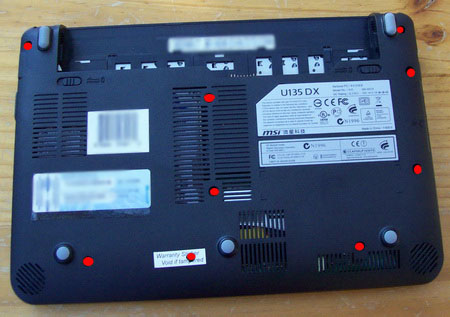
Proceeding past here will probably void your warranty as we will need to break that sticker to get to the screw, so if you want to keep your warranty stop here.
Remove all the screws, and then gently grab the base of the case from the top (up near battery). There are two tabs (located in battery bay) that may require a slight push to release the base but it should start to lift up (there is no real force required, so if it doesnt move with only a slight effort, try to work out why).
What I noticed when I did it was that the right hand side came up quite easily but on the elft hand side the external monitor port connector was holding me back, so in the process of left the base up I moved it to the left in order to move the base away from the monitor connector.
Base off:

The location of the memory slot is easy to find 🙂 Note, when you go to put the memory in, it will only go in one way. It will slide in at about 45 degrees, and once in you can gently push down to a horizontal position when two tabs will grab the module and keep in down.
To put the Netbook back together, reverse the removal instructions and enjoy the Netbook. If something has gone wrong it will not boot at all, so go back and check your work.
The final question – Was it worth the effort? Absolutely. The Netbook runs much better and doesn’t seem to hesitate when opening up programs. It is a much more enjoyable to use.
Hello
Today I installed a 2 Gig of DDR3 204pin SODIMM 1333MHz into my MSI U135 DX memory slot which would give me 3 Gig all up I presumed that it would only see one Gig of the two that I installed, but on start up the net book hung, I removed the 2 Gig of memory and all is back to normal. Do I have to install a 1 Gig module to bring it to the 2 Gig max??
Regards Jack
Yep, it will will work with a 1M stick. 2M is the maximum for this netbook.
After installing 1G of mem (from Crucial) in the MSI L1350 slot, the netbook fails to boot up. It works without the the added mem. Have heard of problems like this?
Hi Sharon, it could only be incompatible RAM, faulty RAM or you have not installed it properly. Is the RAM DDR3?
i have one MSI U135DX IT IN DENISH BUT I WANT THE WINDOWS TO RUN IN ENGLISH WHAT MOST I DO
Important to know is that you should buy DDR3 in case you have a u135DX, but DDR2 if you have a U135…
i have a problem my camera doesn’t work.i just bought my net book msi U135DX..please help me how to fix it..
Is the camera turned on Valerie (hit the Fn + F6 keys together)?
Hello:)
I have installed a Crucial 1gb 204-pin sodimm 128×64 DDR3 PC3-8500 CL7 on my MSI U135DX. When I start the computer and open the system info on the control panel it still says 1gb of RAM! Why? I am pretty sure I put it in the right way!
Oli, the only two things I can think of is 1) that particular brand of RAM is not compatible even though it is the right size etc, or 2) the RAM stick is not seated properly.
hello, my u135dx is running hot, it goes up like 60 degrees celcius, my room temp is around 32 degrees. is it possible to change the cpu fan or put cpu thermal grease on it.
thanks!
Mars, I’m not aware of any replacement fans for the U135dsx.
Normally with overheating laptops/netbooks, the problem will be a faulty fan or a dust build up. Blow some air into the vent where the air normally exits and see how much dust comes out. If there’s a fair bit, that will be your overheating issue solved.
I tried a 1GB DDR3 1333MHz PC3-10660 SO-DIMM RAM of brand Arbeitsspeicher with no success. The computer does not boot up. What do you think the problem is? Which brand of RAM did you use?
I Have the same problem that Moeen, it`s posible a Bios problem?
On the question of which memory to fit, I found that different suppliers gave conflicting specs for the U135DX. Eventually I decided on Crucial because they described theirs as “Upgrade for a MSI (Micro Star) MS-N014 (DDR3) System”, on the basis that if it didn’t work they could hardly refuse a refund! Their spec is “1GB 204-pin SODIMM DDR3 PC-3-12800 1.35v” and their Part Number is CT6027916.
It was delivered very quickly and easily fitted following Indi’s instructions, and on power-up is recognised by the system, which now seems snappier,so all is well. Must say many thanks for the article.
Thanks for your feedback and sharing your findings, Brioni